星火自动驾驶大赛赛事集锦--红绿灯路口减速慢行(方法二)
交通灯场景(TRAFFIC_LIGHT)
场景描述:
当主车在监测到前方的红灯时, 主车停车在停止线前1.5-2.0米处,不得超过停止线。当红灯变为绿灯后,主车可以通过该路段,在通过交通灯区域时,主车的速度不得超过 6 m/s。
场景图示:
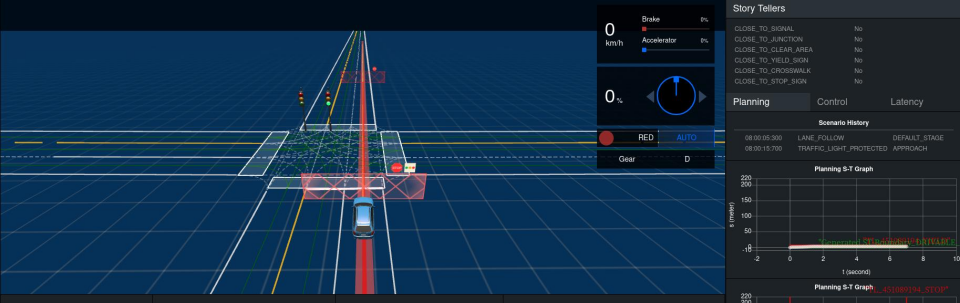
在交通规则中,当我们的车辆遇到红灯或者黄灯时就需要停车等待。在Apollo中设置的交通规则中也满足了这点。当我们的主车检测到前方为红或者黄灯时 (代码如下),在dreamview中的会显示以下界面:如图1 所示;同时也会在实线前多少米(看具体设置的距离,默认值为1米)外生成一道停止墙如图2所示:
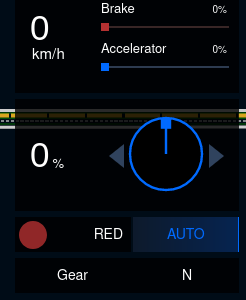
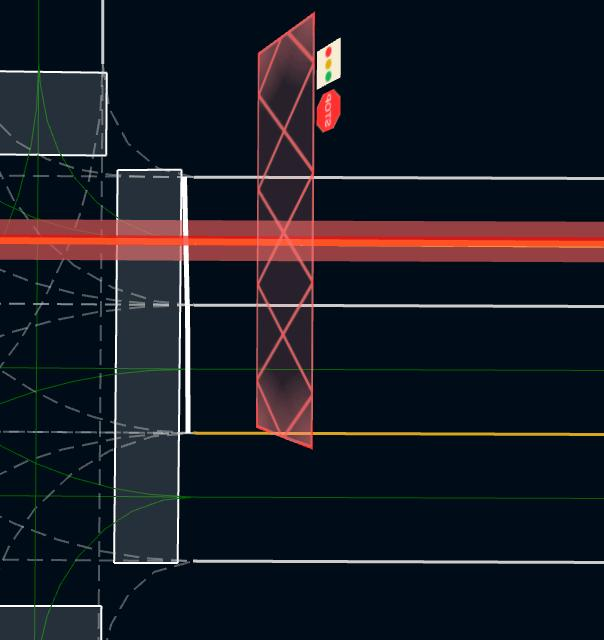
图1:红灯显示 图2:停止墙
评判标准
主车未停车在停止线1.5-2.0米之间, 本场景分扣20分; 速度每超速1m/s, 本场景分扣20分, 超过停止线或者红灯状态未停止, 本场景计0分;
运行视频回放
【百度Apollo星火自动驾驶大赛城市道路预选赛——交通灯路口赛题】 https://www.bilibili.com/video/BV1Ez4y187hG/?share_source=copy_web&vd_source=c5757152d93e2f5dba69049264ebea4e
实验流程:
实验流程大纲
- 默认配置参数规划效果
- 启动dreamview并观察默认配置参数下车辆遇到交通灯的仿真效果。
- 红绿灯场景实践:
- a. 找到planning2.0中Traffic Rules配置的相关文件。
- b. 根据要求,调整Traffic Rules配置参数,确保车辆停车在距离停止线2米至2.5米的位置停车。
- c. 调整通过交叉路口的速度
- d.保存修改后的配置参数,并重新启动planning模块。
- e. 运行车辆规划模块,并在dreamview上观察车辆遇到红绿灯场景的停车变化和通过交叉路口速度
使用插件配置参数流程
生成和使用traffic light插件
输入配置参数同步指令,系统将自动将全局配置参数复制到profile的default目录中,然后就可以在profile目录上轻松修改配置参数。
buildtool profile config init --package planning-traffic-rules-traffic-light --profile=default
使用目录名为default的这份配置参数
aem profile use defaul
查看profile插件目录结构:
tree profiles/default/modules/planning/traffic_rules/
目录结构:
profiles/default/modules/planning/traffic_rules/`-- traffic_light`-- conf`-- default_conf.pb.txt//traffic_light插件参数配置文件
修改插件配置参数
在工作apollo_workspace工作目录找到profiles/default/modules/planning/traffic_rules/traffic_light/conf/default_conf.pb.txt配置文件,调整红绿灯场景停止配置参数,达到我们期望路径规划效果。
(1) 使用在线编辑工具修改profiles/default/modules/planning/traffic_rules/traffic_light/conf/default_conf.pb.txt配置文件,将stop_distance 参数
在全局配置参数中找到红绿灯场景停止配置参数:
stop_distance: 1.0
将配置参数的值修改为:
stop_distance: 2.0
仿真对比:
原始 | 修改后 | |
绕行距离配置实践 | 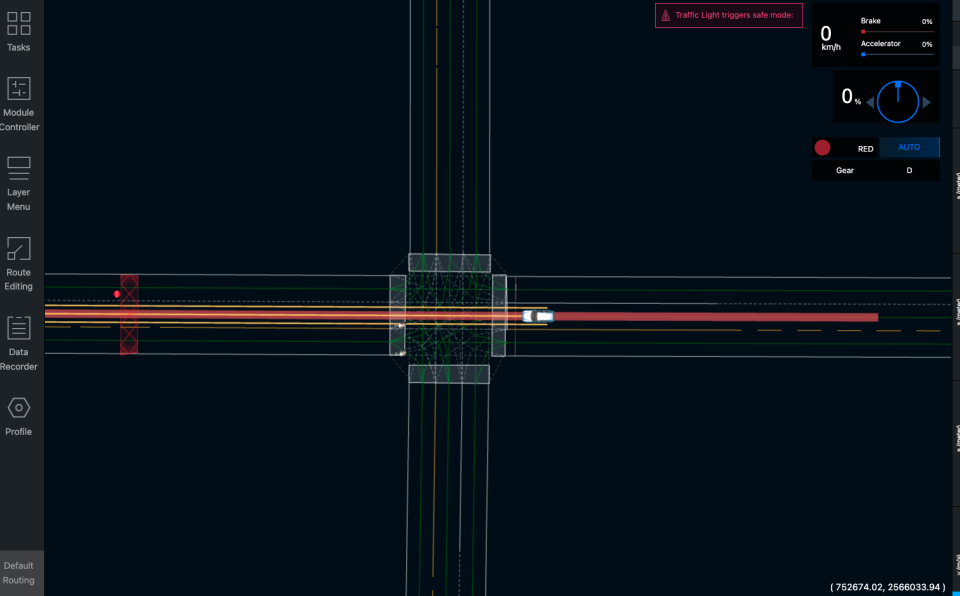 | 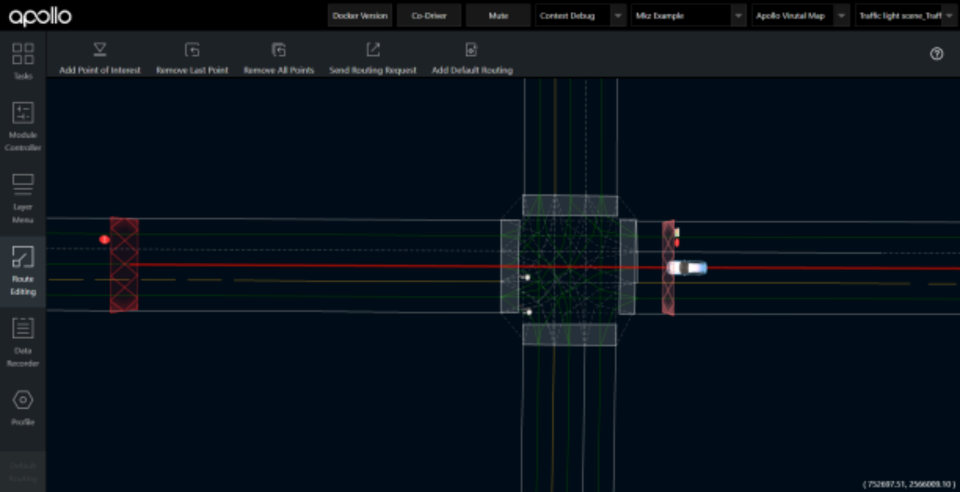 |
云实验链接:
该实践内容已经上线Apollo云实验室,开快速启动进行实践体验: https://apollo.baidu.com/community/course/9
技术详解
交通灯场景运行流程框图
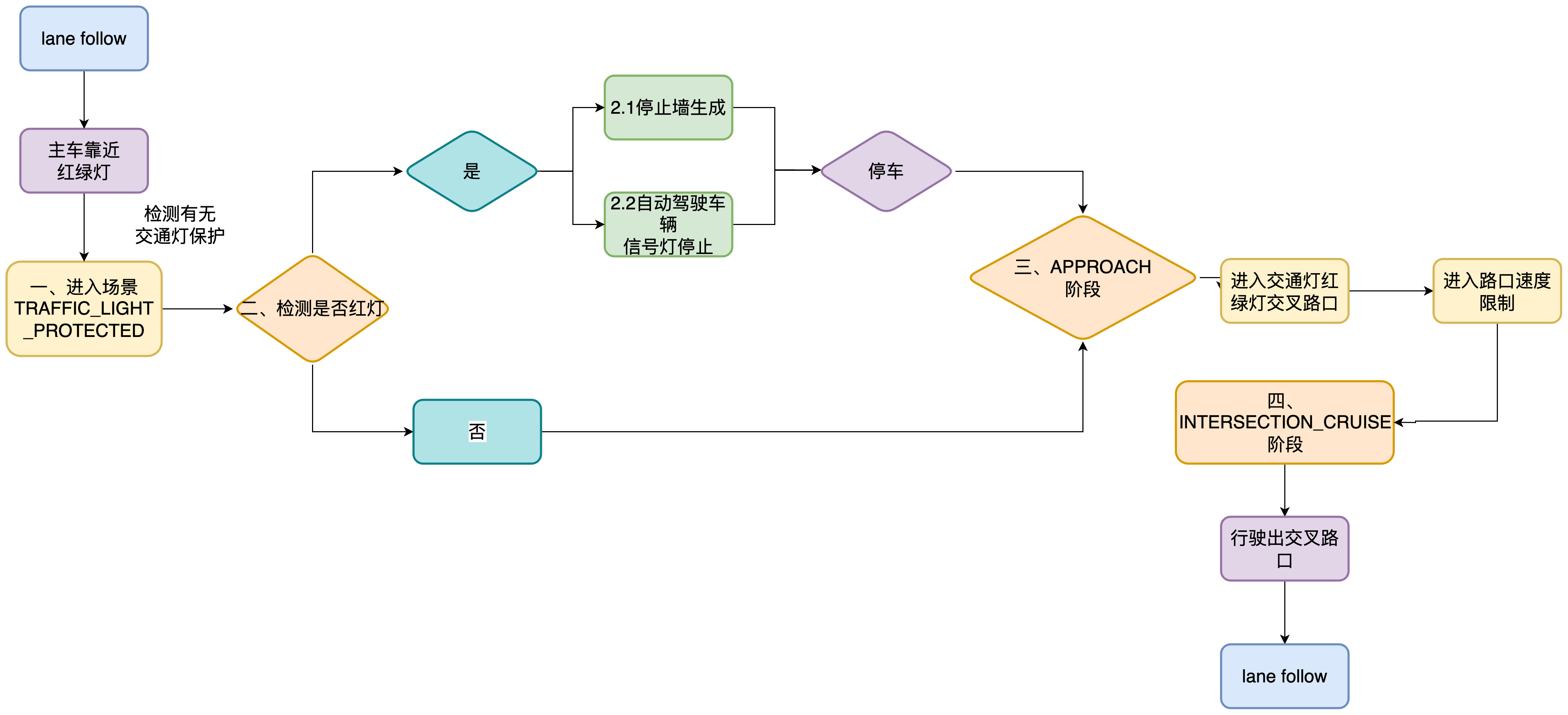
一、进入TRAFFIC_LIGHT_PROTECTED场景
代码以及代码路径(节选):
.aem/envroot/opt/apollo/neo/src/modules/planning/scenarios/traffic_light_protected/conf/scenario_conf.pb.txt
start_traffic_light_scenario_distance: 5.0#当距离红绿灯的停车道5.0米时进入TRAFFIC_LIGHT_PROTECTED场景
代码以及代码路径(节选):
.aem/envroot/opt/apollo/neo/src/modules/planning/scenarios/traffic_light_protected/traffic_light_protected_scenario.cc
如果 adc_distance_to_traffic_light 小于等于0(表示车辆已经过了交通信号灯)或者大于起始检查距离(start_check_distance),那么就不进入交通信号灯场景,继续下一个信号灯的判断。否则进入交通信号灯场景
// enter traffic-light scenarios: based on distance onlyif (adc_distance_to_traffic_light <= 0.0 ||adc_distance_to_traffic_light > start_check_distance) {continue;}
交通灯场景TRAFFIC_LIGHT_PROTECTED定义了两个stage
.aem/envroot/opt/apollo/neo/share/modules/planning/scenarios/traffic_light_protected/conf/pipeline.pb.txt
stage: {name: "TRAFFIC_LIGHT_PROTECTED_APPROACH"type: "TrafficLightProtectedStageApproach"enabled: true…}stage: {name: "TRAFFIC_LIGHT_PROTECTED_INTERSECTION_CRUISE"type: "TrafficLightProtectedStageIntersectionCruise"enabled: true…}
TRAFFIC_LIGHT_PROTECTED_APPROACH和TRAFFIC_LIGHT_PROTECTED_INTERSECTION_CRUISE的注册
代码以及代码路径(节选):
s_stage_factory_.Register(ScenarioConfig::TRAFFIC_LIGHT_PROTECTED_APPROACH,[](const ScenarioConfig::StageConfig& config,const std::shared_ptr<DependencyInjector>& injector) -> Stage* {return new TrafficLightProtectedStageApproach(config, injector);});s_stage_factory_.Register(ScenarioConfig::TRAFFIC_LIGHT_PROTECTED_INTERSECTION_CRUISE,[](const ScenarioConfig::StageConfig& config,const std::shared_ptr<DependencyInjector>& injector) -> Stage* {return new TrafficLightProtectedStageIntersectionCruise(config,injector);});
如果自动驾驶车辆遇到交通灯为红灯
二、红绿灯检测:

代码以及代码路径(节选):
.aem/envroot/opt/apollo/neo/src/modules/planning/traffic_rules/traffic_light/traffic_light.cc
这段代码的作用是检查交通灯是否已经完成。它遍历已完成的交通灯重叠区域的ID列表,然后将当前交通灯的ID与这些ID进行比较。如果当前交通灯的ID在已完成的交通灯重叠区域的ID列表中,那么设置变量traffic_light_done为true,然后退出循环。
bool traffic_light_done = false;for (const auto& done_traffic_light_overlap_id :traffic_light_status.done_traffic_light_overlap_id()) {if (traffic_light_overlap.object_id == done_traffic_light_overlap_id) {traffic_light_done = true;break;}}if (traffic_light_done) {continue;}
2.1停止墙生成源码:
可能有小伙伴会问停止墙是如何生成的呢?停止墙的标志是什么?
首先当我们的主车确认前方交通灯不为绿灯时时,会生成停止墙,停止原因为黄/红信号灯,
代码以及代码路径(节选):
.aem/envroot/opt/apollo/neo/src/modules/planning/traffic_rules/traffic_light/traffic_light.cc
/*函数的作用是生成一条停车决策,并将其添加到参考线信息中。当交通规则需要控制车辆停止时,例如信号灯指示红灯时,就会生成这样的停车决策。*/
util::BuildStopDecision(virtual_obstacle_id, traffic_light_overlap.start_s,config_.stop_distance(), StopReasonCode::STOP_REASON_SIGNAL,wait_for_obstacles, Getname(), frame, reference_line_info);
2.2信号灯停止源码:
代码以及代码路径(节选):
/*这段代码是一个交通灯保护阶段(TrafficLightProtectedStage)中的交通灯靠近阶段(TrafficLightProtectedStageApproach)的处理函数(Process)。首先,它遍历当前交通灯重叠区域的ID列表,并检查每个交通灯的颜色是否为绿灯。如果存在任何一个交通灯不是绿灯,那么设置变量traffic_light_all_done为false,然后退出循环。否则,将变量traffic_light_all_done设置为true。如果所有交通灯都是绿灯,那么函数调用FinishStage()来结束该阶段,然后返回Stage::FINISHED状态。否则,返回Stage::RUNNING状态,表示该阶段仍在运行中。*/
StageResult TrafficLightProtectedStageApproach::Process(const TrajectoryPoint& planning_init_point, Frame* frame) {// traffic_light_all_done 用于标记是否所有交通信号灯都已处理完毕bool traffic_light_all_done = true;// 遍历当前交通信号灯的重叠区域for (const auto& traffic_light_overlap_id :context->current_traffic_light_overlap_ids) {// 获取交通信号灯在参考线上的重叠信息PathOverlap* current_traffic_light_overlap =reference_line_info.GetOverlapOnReferenceLine(traffic_light_overlap_id, ReferenceLineInfo::SIGNAL);if (!current_traffic_light_overlap) {continue;}// 设置交通信号灯不具备交通优先权reference_line_info.SetJunctionRightOfWay(current_traffic_light_overlap->start_s, false);// 获取车辆前沿位置相对于交通信号灯停车线的距离const double adc_front_edge_s = reference_line_info.AdcSlBoundary().end_s();const double distance_adc_to_stop_line =current_traffic_light_overlap->start_s - adc_front_edge_s;auto signal_color = frame->GetSignal(traffic_light_overlap_id).color();// 检查车辆到停车线的距离是否小于最大有效停车距离if (distance_adc_to_stop_line > scenario_config.max_valid_stop_distance()) {traffic_light_all_done = false;break;}// 检查交通信号灯的颜色是否为绿色if (signal_color != TrafficLight::GREEN) {traffic_light_all_done = false;break;}}// 如果所有交通信号灯都已经处理完毕,则返回 FinishStage() 表示阶段已完成if (traffic_light_all_done) {return FinishStage();}// 否则,返回 result.SetStageStatus(StageStatusType::RUNNING) 表示阶段仍在运行中return result.SetStageStatus(StageStatusType::RUNNING);}
当主车靠近红绿灯场景时,会进入Scenario 为TRAFFIC_LIGHT_PROTECTED的红绿灯场景
自动驾驶车辆接近交通信号灯
三、进入APPROACH的stage定义
代码以及代码路径(节选):
/*这段代码是交通灯保护阶段(TrafficLightProtectedStage)中的交通灯靠近阶段(TrafficLightProtectedStageApproach)的处理函数(Process)*/
StageResult TrafficLightProtectedStageApproach::Process(const TrajectoryPoint& planning_init_point, Frame* frame)//APPROACHstage 正在运行{return result.SetStageStatus(StageStatusType::RUNNING);}
/*这段代码是交通灯保护阶段(TrafficLightProtectedStage)中的交通灯靠近阶段(TrafficLightProtectedStageApproach)的结束函数(FinishStage)。当交通灯靠近阶段的任务完成后,该函数会将next_stage_设置为ScenarioConfig::TRAFFIC_LIGHT_PROTECTED_INTERSECTION_CRUISE,表示进入交通灯保护阶段的下一个阶段TRAFFIC_LIGHT_PROTECTED_INTERSECTION_CRUISE。然后,它返回Stage::FINISHED状态,表示该阶段已经完成。*/
Stage::StageStatus TrafficLightProtectedStageApproach::FinishStage()//APPROACHstage 正在完成{//省略next_stage_ = "TRAFFIC_LIGHT_PROTECTED_INTERSECTION_CRUISE";//进入下一个stage TRAFFIC_LIGHT_PROTECTED_INTERSECTION_CRUISEreturn StageResult(StageStatusType::FINISHED);//APPROACH的stage完成}
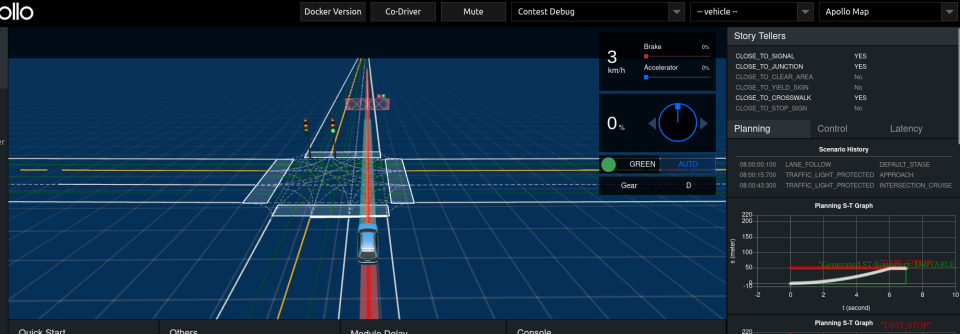
自动驾驶车辆进入红绿灯交叉路口区域

四、进入INTERSECTION_CRUISE的stage定义
代码以及代码路径(节选):
这段代码是交通灯保护阶段(TrafficLightProtectedStage)中的交通灯保护交叉路口阶段(TrafficLightProtectedStageIntersectionCruise)的处理函数(Process)。首先,它调用stage_impl_.CheckDone()函数,检查是否已经通过了交叉路口。如果已经通过了交叉路口,那么将返回true,表示该阶段已经完成。如果该阶段已经完成,那么函数调用FinishStage()来结束该阶段,然后返回Stage::FINISHED状态。否则,返回Stage::RUNNING状态,表示该阶段仍在运行中。
StageResult TrafficLightProtectedStageIntersectionCruise::Process(const common::TrajectoryPoint& planning_init_point, Frame* frame) {bool stage_done = CheckDone(*frame, injector_->planning_context(), true);//定义交叉路口if (stage_done)//如果通过交叉路口{return FinishStage();//INTERSECTION_CRUISE的stage完成}return result.SetStageStatus(StageStatusType::RUNNING);//进入INTERSECTION_CRUISE的RUNNING}
该函数调用FinishScenario()函数,结束整个交通灯保护阶段(TrafficLightProtectedStage),并返回Stage::FINISHED状态,表示该阶段已经完成。
StageResult TrafficLightProtectedStageIntersectionCruise::FinishStage() {return FinishScenario();//INTERSECTION_CRUISE的stage完成}
交通灯场景代码修改部分
任务实现:
停车距离:
输入traffic_rules参数同步指令,系统将自动将traffic_light的配置参数复制到profile的default目录中,然后就可以在profile目录上轻松修改配置参数。
buildtool profile config init --package planning-traffic-rules-traffic-light --profile=default && aem profile use default
profiles/default/modules/planning/traffic_rules/traffic_light/conf/default_conf.pb.txt
stop_distance: 1.0#停止距离为1.0 单位 m
代码实现(节选):
.aem/envroot/opt/apollo/neo/src/modules/planning/planning_base/common/util/common.cc
ObjectDecisionType stop;//定义一个停止墙auto* stop_decision = stop.mutable_stop();//stop决策的停车原因stop_decision->set_reason_code(stop_reason_code);stop_decision->set_distance_s(-stop_distance);//stop决策的停车安全距离
实现场景代码(修改参数的部分):
我们仅仅需要将配置文件TRAFFIC_LIGHT的stop_distance值改为1.5-2.0即可。
因为存在误差值,尽量取中间值。
stop_distance: 1.7#停止距离为1.0 单位 m
3红绿灯路口限速:
3.1 生成插件文件模版
输入下述指令,在modules/planning/traffic_rules/下新建插件文件夹region_speed_limit。
buildtool create --template plugin \--namespaces planning \--name region-speed-limit \--base_class_name TrafficRule modules/planning/traffic_rules/region_speed_limit \--config_message_name RegionSpeedLimitConfig
3.2 写RegionSpeedLimit类代码文件以及配置相应BUILD文件
#include <memory>#include "modules/planning/traffic_rules/region_speed_limit/region_speed_limit.h"namespace apollo {namespace planning {/* 定义成员函数*/using apollo::common::Status;using apollo::hdmap::PathOverlap;bool RegionSpeedLimit::Init(const std::string& name, const std::shared_ptr<DependencyInjector>& injector) {if (!TrafficRule::Init(name, injector)) {return false;}// Load the config this task.return TrafficRule::LoadConfig<RegionSpeedLimitConfig>(&config_);}Status RegionSpeedLimit::ApplyRule(Frame* const frame, ReferenceLineInfo* const reference_line_info) {ReferenceLine* reference_line = reference_line_info->mutable_reference_line();const std::vector<PathOverlap>& pnc_junction_overlaps= reference_line_info->reference_line().map_path().pnc_junction_overlaps();for (const auto& pnc_junction_overlap : pnc_junction_overlaps) {reference_line->AddSpeedLimit(pnc_junction_overlap.start_s - config_.forward_buffer(),pnc_junction_overlap.end_s + config_.backward_buffer(),config_.limit_speed());}return Status::OK();}} // namespace planning} // namespace apollo
- Init()函数:初始化RegionSpeedLimit类,读取配置文件信息到config_;
- ApplyRule()函数:traffic rule类调用接口,在运行中实际调用的函数;
- reference_line_info->reference_line().map_path():获取道路信息,本插件获取了交汇路口信息pnc_junction_overlaps();
- 针对交汇路口的限速功能,调用了ReferenceLine::AddSpeedLimit(double start_s, double end_s, double speed_limit),实现了在start_s处到end_s处最高速度为speed_limit的约束。
#pragma once#include <memory>#include "cyber/plugin_manager/plugin_manager.h"/* 添加了相应的头文件*/#include "modules/common/status/status.h"#include "modules/planning/traffic_rules/region_speed_limit/proto/region_speed_limit.pb.h"#include "modules/planning/planning_interface_base/traffic_rules_base/traffic_rule.h"namespace apollo {namespace planning {class RegionSpeedLimit : public TrafficRule {/* 声明成员函数*/public:bool Init(const std::string& name, const std::shared_ptr<DependencyInjector>& injector) override;virtual ~RegionSpeedLimit() = default;common::Status ApplyRule(Frame* const frame, ReferenceLineInfo* const reference_line_info);void Reset() override {}private:RegionSpeedLimitConfig config_;};CYBER_PLUGIN_MANAGER_REGISTER_PLUGIN(apollo::planning::RegionSpeedLimit, TrafficRule)} // namespace planning} // namespace apollo
Reset()函数:插件变量重置入口,清空上一次决策对插件内变量的更改。
CYBER_PLUGIN_MANAGER_REGISTER_PLUGIN(apollo::planning::RegionSpeedLimit,TrafficRule):声明该类为插件。
BUILD文件描述了源码的构建规则以及其依赖。
load("@rules_cc//cc:defs.bzl", "cc_binary", "cc_library")load("//tools:apollo.bzl", "cyber_plugin_description")load("//tools:apollo_package.bzl", "apollo_cc_library", "apollo_package", "apollo_plugin")load("//tools/proto:proto.bzl", "proto_library")load("//tools:cpplint.bzl", "cpplint")package(default_visibility = ["//visibility:public"])filegroup(name = "region_speed_limit_files",srcs = glob(["conf/**",]),)apollo_plugin(name = "libregion_speed_limit.so",srcs = ["region_speed_limit.cc",],hdrs = ["region_speed_limit.h",],description = ":plugins.xml",deps = ["//cyber",# 添加该插件所需依赖"//modules/planning/planning_interface_base:apollo_planning_planning_interface_base","//modules/planning/traffic_rules/region_speed_limit/proto:region_speed_limit_proto",],)apollo_package()cpplint()
load():声明编译中使用的相关依赖
filegroup():声明文件组,编译后会将其安装到相应位置。
apollo_plugin():声明编译动态库、编译源码文件、插件描述文件、依赖。
3.3 配置参数文件
syntax = "proto2";package apollo.planning;message RegionSpeedLimitConfig {// 声明RegionSpeedLimitConfig中的数据结构optional double forward_buffer = 1 [default = 3];optional double backward_buffer = 2 [default = 2];optional double limit_speed = 3 [default = 5];}
region_speed_limit.proto 文件声明了该插件配置文件的数据结构。
BUILD 文件声明了该proto文件的编译规则。
3.4 写插件参数文件default_conf.pb.txt
forward_buffer: 3.0backward_buffer: 2.0limit_speed: 15.0
3.5 配置cyberfile.xml
<package format="2"><name>region-speed-limit</name><version>local</version><description>This is a demo package</description><maintainer email="sample@sample.com">Apollo Developer</maintainer><license>Apache License 2.0</license><url type="website">https://www.apollo.auto/</url><url type="repository">https://github.com/ApolloAuto/apollo</url><url type="bugtracker">https://github.com/ApolloAuto/apollo/issues</url><type>module</type><src_path>//modules/planning/traffic_rules/region_speed_limit</src_path><builder>bazel</builder><depend type="binary" repo_name="cyber">cyber</depend><!-- add new dependency--><depend type="binary" repo_name="planning-interface-base">planning-interface-base</depend><depend>bazel-extend-tools</depend></package>
声明文件版本等信息
3.6修改plugins.xml:
plugin_region_speed_limit_description.xml文件修改成plugin.xml文件
<library path="modules/planning/traffic_rules/region_speed_limit/libregion_speed_limit.so"><class type="apollo::planning::RegionSpeedLimit" base_class="apollo::planning::TrafficRule"></class></library>
3.7 traffic_rule_config.pb.txt中加入新增插件
将新建插件加入traffic rule配置文件中,从而使planning调用该traffic rule。
rule {name: "BACKSIDE_VEHICLE"type: "BacksideVehicle"}rule {name: "CROSSWALK"type: "Crosswalk"}rule {name: "DESTINATION"type: "Destination"}rule {name: "KEEP_CLEAR"type: "KeepClear"}rule {name: "REFERENCE_LINE_END"type: "ReferenceLineEnd"}rule {name: "REROUTING"type: "Rerouting"}rule {name: "STOP_SIGN"type: "StopSign"}rule {name: "TRAFFIC_LIGHT"type: "TrafficLight"}rule {name: "YIELD_SIGN"type: "YieldSign"}rule {name: "REGION_SPEED_LIMIT"type: "RegionSpeedLimit"}
3.8 编译插件
执行以下命令编译插件
buildtool build -p modules/planning/traffic_rules/region_speed_limit/