
apollo_logo
2
0

技术文档|打通与ROS的通信,扩展自动驾驶系统生态

概述

新版本Cyber RT对框架进行了改造,支持了Cyber RT与ROS的通信。具有以下功能亮点:

实现常用消息的转换功能,低成本即开即用:

新版本的cyber打通了部分常用传感器的消息通信,实现了相应消息转换功能,包括点云、IMU等消息格式,关心这部分消息通信的用户只需在配置中对齐两端的channel,启动即可使用。

插件化的消息转换框架,提升开发效率:

如果用户还想实现除上述消息以外的消息通信,新版本cyber还提供了基于插件化的消息转换框架,用户无需关心cyber和ros的通信接口,只需实现消息转换函数,配置好对应的channel,就能在Apollo各模块中接收由ros发送出来的消息,进一步提升开发效率。


技术说明

打平通信屏障

ROS 使用 rclcpp 的通信接口,而 Cyber RT 本身也有一套通信接口,由于消息中间件的底层版本/应用层接口的巨大差异,两者互不兼容,并且迁移和适配成本会相当高。

因此,在新的 Cyber RT 版本中,我们打平了通信中间件的版本,开发了 ros-bridge 适配了 ros 2 的通信接口,实现了 消息从 cyber 到 ros_bridge 到 ros 的通路,以及从 ros 到 ros_bridge 到 cyber 的通路:

插件化的消息转换框架,更低开发成本

除了依赖打平和接口适配以外,由于 Apollo 的消息与 ROS 消息定义的不同,开发者使用 ros bridge 的时候是逃不开相互之间的消息转换逻辑的。而这部分消息转换代码与 Cyber RT 的通信接口、ROS 的 rclcpp 接口强耦合,学习成本高,易用性低,并且难以维护。因此,我们基于 Apollo 9.0 中的 Cyber RT 插件机制,解耦消息转换逻辑与 ros_bridge 内部运行逻辑:
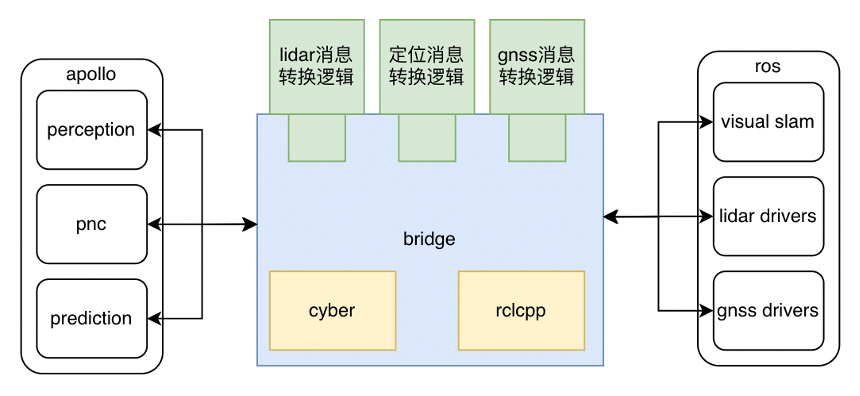
开发者只需关注消息如何转换,开发消息转换的插件即可,无需关注各类型通信接口的处理。

  • 此处的 ROS 特指 ROS 2 的 foxy - iron 发行版,目前不支持 ROS 1
  • 目前 Apollo 环境中,由于 ROS 的环境限制,ROS bridge只支持在 ubuntu 20.04 和 22.04 的镜像上运行,不支持在 18.04 镜像上运行

使用方式

1.前序工作:部署Apollo

要使用新版本Cyber RT的性能分析功能,只需部署最新版本的Apollo即可

源码

源码

  1. clone Apollo最新代码切换到preview分支
git clone https://github.com/ApolloAuto/apollo.git && git checkout preview
  1. 使用工程中的aem启动并进入容器
./aem/aem start
  1. 编译 Apollo
buildtool build
  1. 配置ros环境
buildtool rosenv -t # -t 指的是使用清华源

如果需要实现非ros官方的消息通信,用户需要使用 -p 参数指明非标准消息的源码路径,一般指定用户已有的ros工程中的src路径即可

  1. source ros的脚本
source /opt/ros/iron/setup.sh # 如果您的ubuntu是22.04
source /opt/ros/galactic/setup.sh # 如果您的ubuntu是20.04
  1. 编译 ros bridge
buildtool build -p cyber

包管理

包管理

  1. clone 最新Apollo工程,切换到preview分支
git clone https://github.com/ApolloAuto/application-core.git && git checkout preview
  1. 使用工程中的aem启动并进入容器
./aem/aem start
  1. 安装 Apollo 软件包
buildtool build
  1. 安装cyber源码
buildtool install cyber
  1. 配置ros环境
buildtool rosenv -t # -t 指的是使用清华源

如果需要实现非ros官方的消息通信,用户需要使用 -p 参数指明非标准消息的源码路径,一般指定用户已有的ros工程中的src路径即可

  1. source ros的脚本
source /opt/ros/iron/setup.sh # 如果您的ubuntu是22.04
source /opt/ros/galactic/setup.sh # 如果您的ubuntu是20.04
  1. 编译 ros bridge
buildtool build -p cyber

2.分场景使用 Cyber RT 中的 ros_bridge 程序

注意事项:

  1. 由于 fatsrtps 限制,目前 ros_bridge 与 ros 程序的通信只支持 rmw_cyclonedds_cpp 中间件进行通信,如果使用默认 fastrtps 通信会导致程序崩溃,所以请在运行 ros_bridge 的窗口配置以下环境变量指定使用cyclonedds:

export RMW_IMPLEMENTATION=rmw_cyclonedds_cpp

  1. ros的软件包可以在apollo环境下或者在同一台域控制器内的非apollo环境下运行:
    1. (推荐)假如 ros_bridge 与 ros 程序不在同一个环境中,需要配置 DOMAIN_ID,请在 ros 工程中的shell窗口以及运行 ros_bridge 的窗口配置以下环境变量,使得ros能够跨环境通信:

export ROS_DOMAIN_ID=0

    1. 假如 ros_bridge 与 ros 程序在 Apollo 环境中,可以直接拷贝 ros 程序的源码到 Apollo 工程目录的 ros_ws 路径下,然后使用 rosdep、colcon 安装依赖和编译

基础驱动消息通信

2.1 基础驱动消息通信

假设您的域控制器内已存在一个 ROS 工程,如果您的需求只是单纯打通 ros 中的 lidar 驱动、gnss 驱动或者定位算法与 Apollo 各模块的通信,ros_bridge 程序已经内置这些基础消息的转换逻辑,只需在相应的配置文件中修改两方的 channel 即可:

  • lidar 消息转换插件

配置文件:

/apollo/cyber/ros_bridge/converters/common_plugins/pointcloud_msg_converter/conf/default.pb.txt
name: "lidar"
apollo_channel_name_0: "/apollo/lidar/pointcloud2"
ros_topic_name_0: "/ros/lidar/pointcloud2"

其中,apollo_channel_name_0 指的是 apollo 读取 lidar 消息的 channel,ros_topic_name_0 指的是 ros 程序发送 lidar 消息的 topic。设置完毕后,输入:

ros_bridge

启动 ros_bridge 程序,ros_bridge 将会从 "/ros/lidar/pointcloud2" 读取 lidar 的消息,进行一定规则转换,发送到 "/apollo/lidar/pointcloud2" channel 中,供下游 Apollo 模块使用

  • gnss 消息转换插件

lidar 消息转换是一对一的关系,而 gnss 部分则相对复杂,涉及到多对多才能完成 ros 的 gnss 消息转换到 apollo 的过程

配置文件:

/apollo/cyber/ros_bridge/converters/common_plugins/gnss_msg_converter/conf/heading_msg_fusion.pb.txt # 融合 ros 的 nav_sat_fix、odometry,输出 Apollo Heading 消息转换插件
/apollo/cyber/ros_bridge/converters/common_plugins/gnss_msg_converter/conf/imu_msg_converter.pb.txt # 转换 ros 的 imu,输出 Apollo imu 的消息转换插件
/apollo/cyber/ros_bridge/converters/common_plugins/gnss_msg_converter/conf/nav_msg_converter.pb.txt # 转换 ros 的 nav_sat_fix,输出 Apollo gnss best pose 的消息转换插件
/apollo/cyber/ros_bridge/converters/common_plugins/gnss_msg_converter/conf/odometry_msg_converter.pb.txt # 假如 ros 的 gnss 驱动本身不输出 odometry,这个插件基于卡尔曼滤波融合了 imu 和 nav_sat_fix,输出 ros odometry
/apollo/cyber/ros_bridge/converters/common_plugins/gnss_msg_converter/conf/odometry_parser.pb.txt # 转换 ros 的 odometry,输出 Apollo odometry 的消息转换插件

配置文件的 channel 配置与 lidar 消息转换插件类似,此处不再过多叙述

  • 定位消息转换插件

定位消息插件 ros odometry 的消息类型转换成 apollo 的 localization_estimate 以及 transform,此处定位输出的消息必须是世界坐标系的消息,或者能够对应的上 apollo 地图的坐标

自行开发消息转换插件

2.2 自行开发消息转换插件

除上述消息以外,如果您想实现其他消息的转换,可以自行实现消息转换插件,具体逻辑可以参考 lidar 消息转换插件:

.
├── BUILD
├── conf
│ └── default.pb.txt # 配置文件
├── lidar_pointcloud.cc # 转换插件的实现文件
├── lidar_pointcloud.h # 转换插件的头文件
└── plugins.xml # 插件描述文件
#pragma once
#include <algorithm>
#include <memory>
#include <cstring>
#include <string>
// 引入 cyber 的必要头文件
#include "cyber/cyber.h"
#include "cyber/plugin_manager/plugin_manager.h"
#include "cyber/ros_bridge/converter_base/convert_interface.h"
#include "modules/common_msgs/sensor_msgs/pointcloud.pb.h"
// 引入 ros 对应消息的头文件
#include "sensor_msgs/point_cloud2_iterator.hpp"
// 定义输入输出
using InputMsg = sensor_msgs::msg::PointCloud2;
using OutputMsg = apollo::drivers::PointCloud;
using InputMsgPtr = std::shared_ptr<InputMsg>;
using OutputMsgPtr = std::shared_ptr<OutputMsg>;
namespace apollo {
namespace cyber {
...
// 继承 apollo::cyber::RosApolloMessageConverter 基类
class LidarPointcloud :
public apollo::cyber::RosApolloMessageConverter<
InputTypes<InputMsgPtr>, OutputTypes<OutputMsgPtr>> {
// apollo::cyber::RosApolloMessageConverter<InputTypes<InputMsgPtr>, OutputTypes<OutputMsgPtr>> 指的是1对1消息转换插件,目前 apollo 支持最高4对4消息转换插件,例如:
// apollo::cyber::RosApolloMessageConverter<InputTypes<InputMsgPtr1, InputMsgPtr2>, OutputTypes<OutputMsgPtr>> 是将 ROS 中的两个消息转换成 Apollo 1个消息的消息转换插件
// apollo::cyber::ApolloRosMessageConverter<InputTypes<InputMsgPtr1, InputMsgPtr2>, OutputTypes<OutputMsgPtr>> 是将 Apollo 中的两个消息转换成 ROS 的1个消息的消息转换插件
public:
LidarPointcloud() {}
~LidarPointcloud() {}
...
// 定义 ConvertMsg 函数
virtual bool ConvertMsg(
InputTypes<InputMsgPtr>&, OutputTypes<OutputMsgPtr>&);
return value;
}
...
};
// 使用cyber提供的宏注册插件,第一个参数是插件类名,第二个参数是apollo::cyber::MessageConverter,复制即可
CYBER_PLUGIN_MANAGER_REGISTER_PLUGIN(
apollo::cyber::LidarPointcloud, apollo::cyber::MessageConverter)
} // namespace cyber
} // namespace apollo
#include "cyber/ros_bridge/converters/common_plugins/pointcloud_msg_converter/lidar_pointcloud.h" // NOLINT
namespace apollo {
namespace cyber {
// 实现消息转换逻辑
bool LidarPointcloud::ConvertMsg(
InputTypes<InputMsgPtr>& in, OutputTypes<OutputMsgPtr>& out) {
auto in_msg = std::get<0>(in.values);
auto out_msg = std::get<0>(out.values);
...
for (size_t i = 0; i < cloud_msg.height * cloud_msg.width; ++i) {
auto pointcloud = out_msg -> add_point();
pointcloud -> set_x(x);
pointcloud -> set_y(y);
pointcloud -> set_z(z);
pointcloud -> set_intensity(static_cast<uint32_t>(std::round(intensity)));
pointcloud -> set_timestamp(static_cast<uint64_t>(timestamp * 10e9));
}
return true;
}
} // namespace cyber
} // namespace apollo
load("//tools:cpplint.bzl", "cpplint")
load("//tools:apollo_package.bzl", "apollo_package", "apollo_plugin")
load("//tools/platform:build_defs.bzl", "if_aarch64", "if_gpu")
package(default_visibility = ["//visibility:public"])
filegroup(
name = "runtime_files",
srcs = glob([
"conf/**",
"data/**",
]),
)
apollo_plugin(
name = "liblidar_pointcloud_plugin.so",
srcs = ["lidar_pointcloud.cc"],
hdrs = ["lidar_pointcloud.h"],
description = ":plugins.xml",
deps = [
"//cyber",
"//modules/common_msgs/sensor_msgs:pointcloud_proto",
"//cyber/ros_bridge:converter_base",
"//cyber/proto:simple_proto",
"//cyber/ros_bridge/proto:converter_conf_proto",
"@ros" # 说明依赖ros
],
)
apollo_package()
cpplint()
<library path="cyber/ros_bridge/converters/common_plugins/pointcloud_msg_converter/liblidar_pointcloud_plugin.so"> // 指明插件动态库的相对路径
<class type="apollo::cyber::LidarPointcloud" base_class="apollo::cyber::MessageConverter"></class> // 指明插件类名,基类名使用apollo::cyber::MessageConverter即可
</library>
name: "lidar"
apollo_channel_name_0: "/apollo/lidar/pointcloud2" # 对应 apollo 第一个消息的 channel
ros_topic_name_0: "/ros/lidar/pointcloud2" # 对应 ros 第一个消息中的 channel

完成开发后,还需为 ros_bridge 指定加载这个新插件:

vim /apollo/cyber/ros_bridge/conf/ros_bridge_conf.pb.txt

假设新插件类型名为:SamplePlugin

converter {
type: "LidarPointcloud"
}
converter {
type: "HeadingMsgFusion"
}
converter {
type: "ImuMsgConverter"
}
converter {
type: "NavMsgConverter"
}
converter {
type: "OdometryMsgConverter"
}
# 加入以下内容即可
converter {
type: "SamplePlugin"
}

修改完毕使用 buildtool build -p cyber 编译,然后正常启动 ros_bridge即可

原创声明,本文由作者授权发布于Apollo开发者社区,未经许可,不得转载。
发表评论已发表 0 条评论
登录后可评论,请前往 登录
暂无评论~快去发表自己的独特见解吧!
目录
概述
技术说明
使用方式
1.前序工作:部署Apollo
源码
包管理
2.分场景使用 Cyber RT 中的 ros_bridge 程序
2.1 基础驱动消息通信
2.2 自行开发消息转换插件